







Esports continues to accelerate in popularity among collegiate institutions and K-12 schools in the United States. Esports adoption is prospering in the form of varsity programs, league competitions, clubs, tournaments, and community events.
Numerous colleges and universities, and a growing number of high schools have a facility dedicated to their esports organizations for training, practice, and hosting competitive matches against visiting teams. When not used for team activity, they’re often available for clubs, recreational use, and other activities.
What’s in an esports facility?
A glorified computer lab is a simplified way to describe an education esports venue, with rows of gaming PCs, adorned with the décor of LED-illuminated elements, most notably the institution’s thematic colors, and the esports team logo signified by an emblem or mascot.
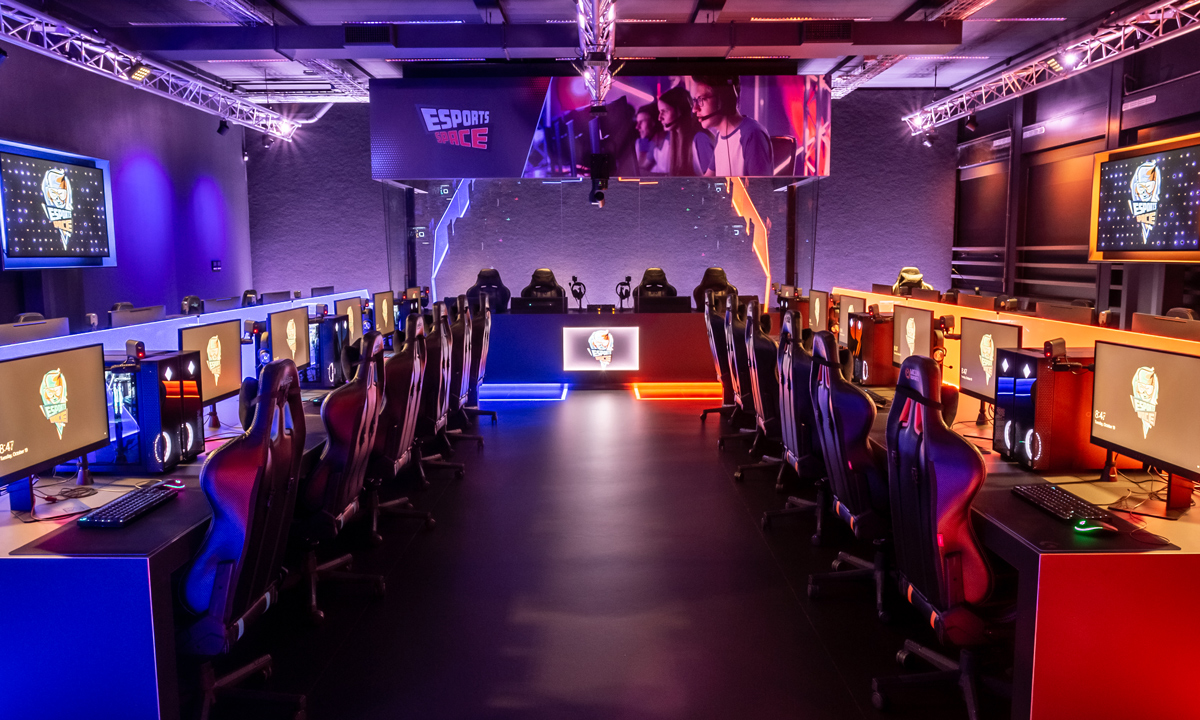
Grafisch Lyceum Rotterdam (GLR) – see case study for more information
However, an esports venue is much more than just a computer lab. It’s very busy and multifunctional during intense practice sessions and competitive events, with the need to have areas for coaching staff, supporting personnel, officiating staff, the spectators, and of course, the players.
A well-outfitted esports facility in a university (or high school) will include some or all of the following, each in their defined spaces.
- The player zone, with gaming PCs and associated furniture grouped together in rows or pods. This is the prime area of the esports venue.
- The coach’s station, a workstation, alcove, or office to monitor live event activity, practice with or train players, review recorded gameplays, and more.
- The shoutcaster’s station, a designated space for one or two commentators to provide play-by-play narration and analysis during live matches.
- A room or section for spectators to gather and watch competitions on one or more screens.
In more elaborate venues, there may also be a production and broadcast zone, dedicated to managing video and audio presentations, lighting, livestreaming, recording, and other relevant functions.
How does AV play into esports?
Pro AV is a natural fit for esports operations because of the many practical benefits of having displays, a sound system, cameras, production equipment, and lighting throughout the venue to entertain spectators during competitions, facilitate shoutcaster commentary, present content for coaching and instruction, and many other activities.
AV over IP is particularly ideal for esports venues, because sources and displays are likely to be dispersed throughout the facility. There is also the need to accommodate many possible scenarios for how and where live gaming activity, recorded gameplays, digital signage, leaderboards, camera feeds, themed animations, and other content will be displayed.
Additionally, esports facilities may have an indeterminate number of sources and displays throughout their lifespans. The system may initially be a smaller design for budget considerations, but continually expanded as more use cases are identified.
In the end, these considerations call for the flexibility to distribute signals anywhere and everywhere as needed, something networked AV can best provide for an installation of considerable scope such as esports.
Why is OmniStream ideal for esports?
Atlona OmniStream™ is a flexible, scalable, and cost-effective AV over IP platform that delivers high-performance AV distribution and solid reliability for demanding esports applications. It runs over standard Gigabit Ethernet infrastructure. This makes it straightforward for pre-installation planning to provide sufficient Category network cabling. There may be pre-existing CAT 6A or CAT 5e cabling in the facility, that could be available for AV integration use.

But when it comes to OmniStream and esports, these advantages are just the beginning. Let’s take a closer look at specific OmniStream technologies and features that are particularly beneficial to esports applications.
Advanced codec
OmniStream features VCx™, an advanced codec designed to deliver pristine quality graphics and fast-motion video, along with essentially zero encode-to-decode latency (significantly less than one frame). These capabilities are tailor-made for the fast-paced dynamic nature of gaming imagery. For a gaming PC, OmniStream is ideal for capturing the secondary HDMI® output of the graphics card, leaving the primary DisplayPort™ output for the gaming monitor.
Ultra-fast switching
Another core feature of OmniStream AV over IP systems is integrated video signal processing that enables extremely fast switching between sources, with transition times well below 0.5 second. This ensures professional-quality image presentations, such as during live events when gaming and camera views need to be quickly switched between players.
Multiview processing
OmniStream systems also allow multiple image sources to be presented on one display. The AT-OMNI-121 decoder ingests streams from up to four AT-OMNI-111 encoders and can display them as a quad, side-by-side, or picture-in-picture (PIP) view. The encoders are capable of delivering a high-resolution stream for full-screen display, and a secondary stream at a resolution appropriate for windowing on a multiview display.
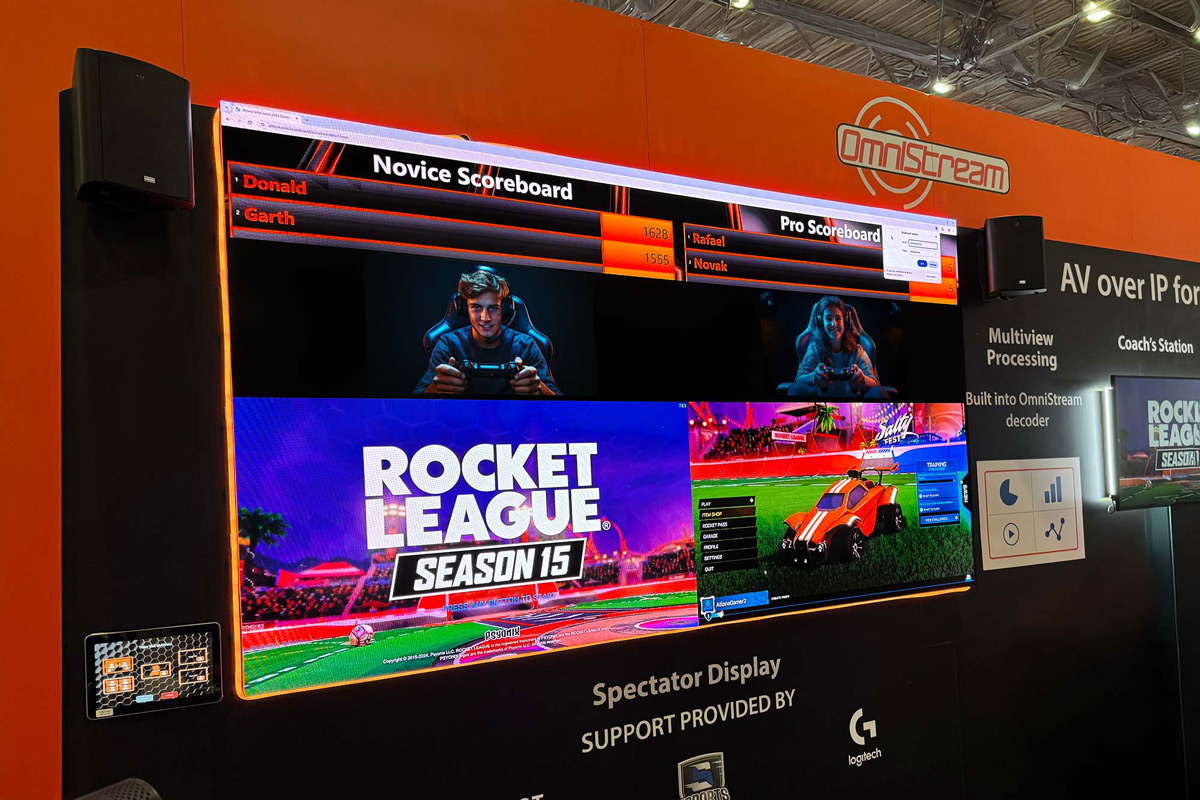
Multiview image presentation from OmniStream decoder
Multiview image presentations are great for live esports competitions, especially with the growth of large, direct-view LED display systems. They allow everyone to see two or more players in action at the same time, along with camera close-ups, live scoreboards, the university team logo, and more. A shoutcaster can tap into a series of pre-built multiview configurations, and select gaming and other sources to presented in the windows.
Video wall processing
Video walls continue to be popular and cost-effective for providing large, prominent image presentations. For an esports facility, a video wall could be in the gaming zone, the spectator area, or in more elaborate venues, the entrance lobby. OmniStream provides native processing for video walls that are typically in 2×2 or 3×3 configurations, with possibilities for much larger sizes and creative aspect ratios. Both landscape and portrait displays can be supported.
Thumbnail source preview
Shoutcasters and other staff can greatly benefit from an intuitive means of managing live presentations. A key aspect is a simple, efficient means of selecting image sources for display, allowing dynamic, on-the-fly changes to keep live events moving along as smoothly as possible.
When integrated with Atlona Velocity™ AV control, a user can monitor live image sources such as gameplay and camera feeds as thumbnails on a touch panel interface. Images are captured every two seconds to allow a quick visual preview, before taking further action on source selections to the audience. Thumbnail previews are also available through the OmniStream device web GUI, and can be used to validate normal system operation.
Demonstrating OmniStream for esports
Atlona delivered a comprehensive demonstration of esports and OmniStream at InfoComm 2024. The demo replicated a real-life facility with a gaming zone, shoutcaster station, a designated station for the coach, and a large direct-view LED display for spectators. The system design included numerous AT-OMNI-111 encoders and AT-OMNI-121 decoders to tie together PCs, cameras, displays, and an audio system. The system was integrated with Velocity AV control and several touch panels throughout to allow Atlona staff to deliver system demos to visitors from multiple locations.
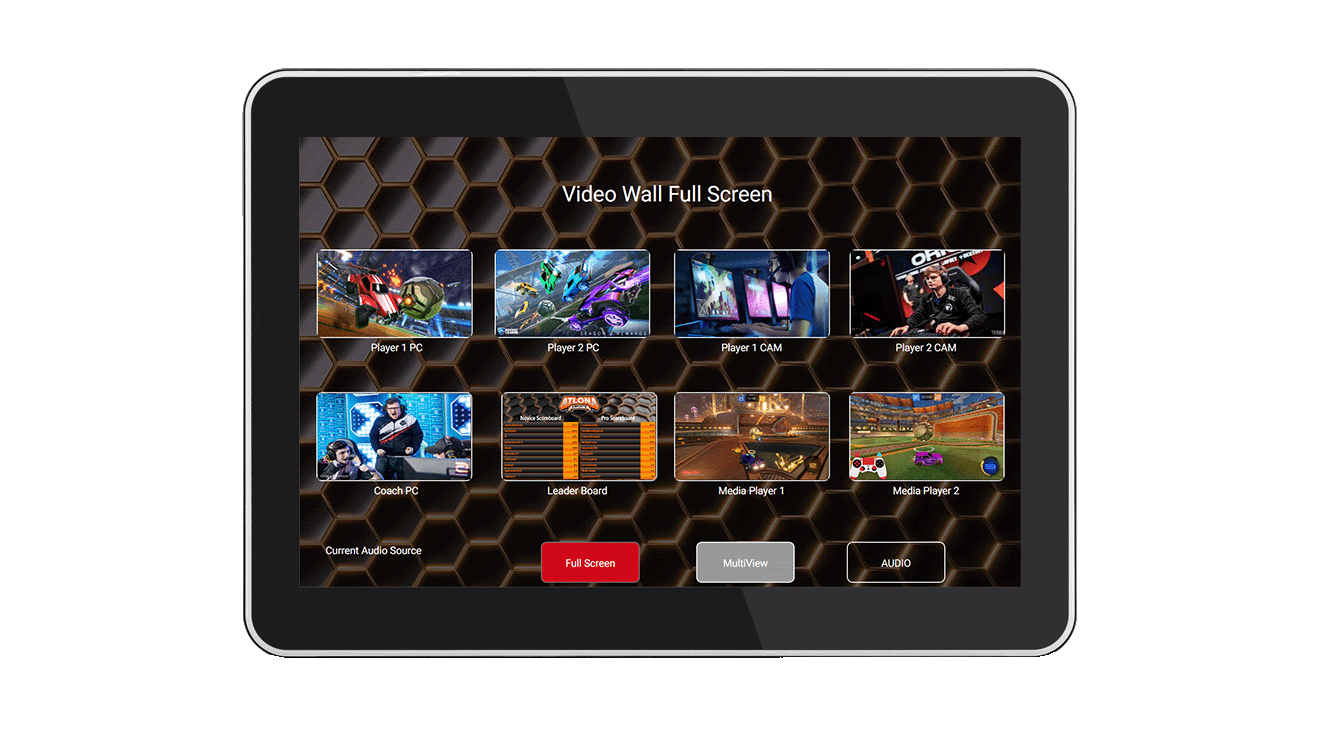
OmniStream allows image sources to be previewed on a Velocity control touch panel
Demonstrating OmniStream for esports
Atlona delivered a comprehensive demonstration of esports and OmniStream at InfoComm 2024. The demo replicated a real-life facility with a gaming zone, shoutcaster station, a designated station for the coach, and a large direct-view LED display for spectators. The system design included numerous AT-OMNI-111 encoders and AT-OMNI-121 decoders to tie together PCs, cameras, displays, and an audio system. The system was integrated with Velocity AV control and several touch panels throughout to allow Atlona staff to deliver system demos to visitors from multiple locations.
The system was used to host (friendly) competitive Rocket League gameplays in a quest to win a gaming chair from Spectrum Industries. The OmniStream system with Velocity control delivered continuous, rock-solid operation for three straight days, with no glitches whatsoever.
For more information about OmniStream systems for esports applications, please contact your Atlona representative.